It phones your supplier.
Reads the order line by line. They press 1 to confirm, and you get a text.
Chefrys One handles the paperwork behind every plate, from invoices and costing to ordering and prep, and keeps your kitchen’s recipes and know-how safe in one place.
Meanwhile, in Chefrys One
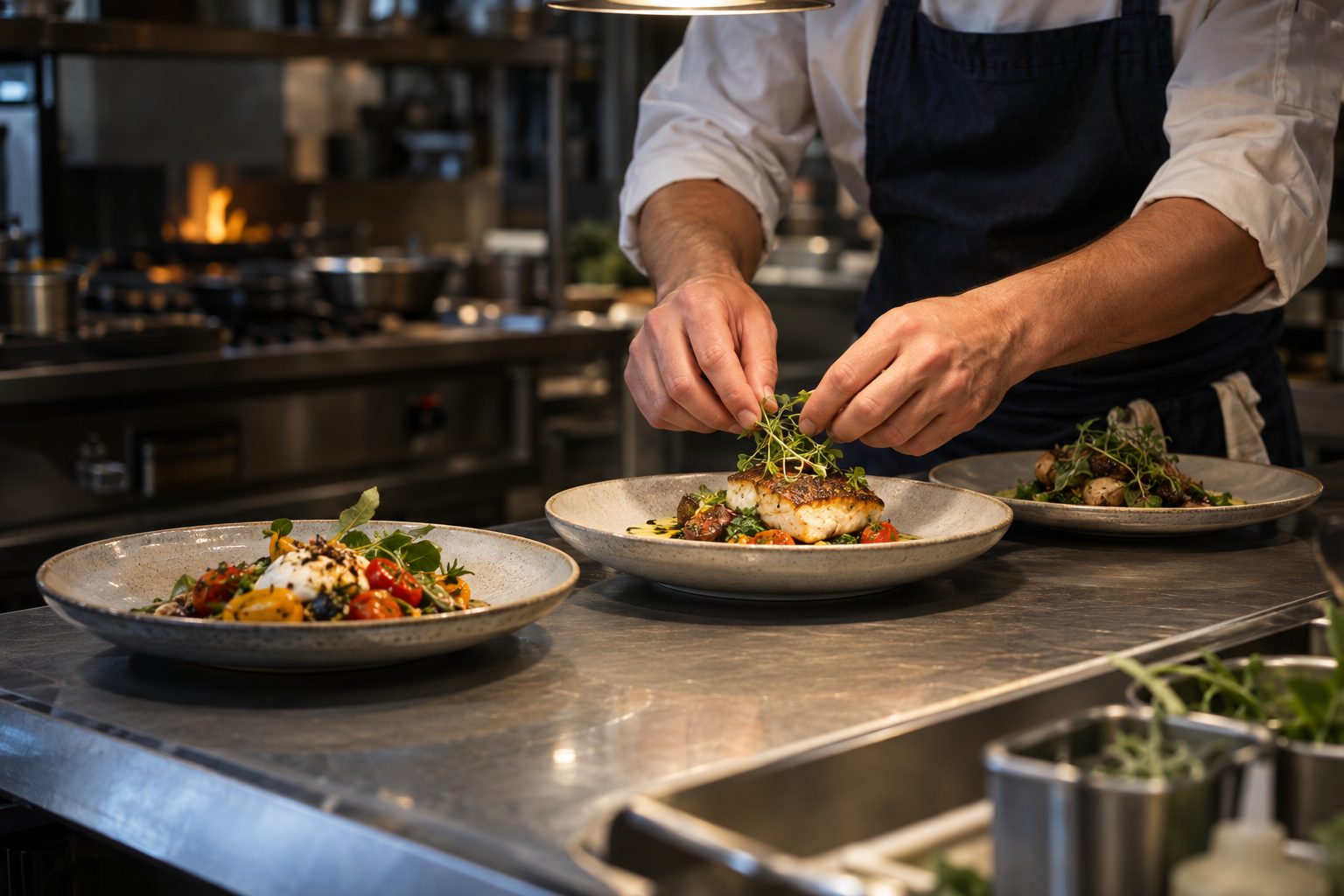
Illustration · example kitchen
Recipe costs that follow your supplier prices.
Turn photos, PDFs and exports into usable data.
Recipes, counts and prep your team can access.
See it in action
Recorded in the app on a demo kitchen: an invoice read into prices, a recipe from a video link, a phone count, orders and Roux.
Demo kitchen · supplier names are fictional.
Wait, it can do that?
All in Chefrys One today. Supplier calls and drawn dish photos come with a plan.
Reads the order line by line. They press 1 to confirm, and you get a text.
A photo of a dish becomes a recipe card to check: ingredients, amounts, allergens.
Instagram, YouTube and recipe sites too. Costed with your own prices.
Every invoice line checked against the order: price rises, short or extra items.
Swaps checked for allergens and re-costed before you commit.
Dish photos drawn from your menu, for a picture menu you can share.
Who it’s for
One connected system underneath. The tools up front match how you work.
Every event, costed and prepped.
Protect your margin, service after service.
Banquets and outlets on one system.
One platform. Your whole kitchen.
Your kitchen already has the information. Chefrys One connects it, so the next decision gets easier.
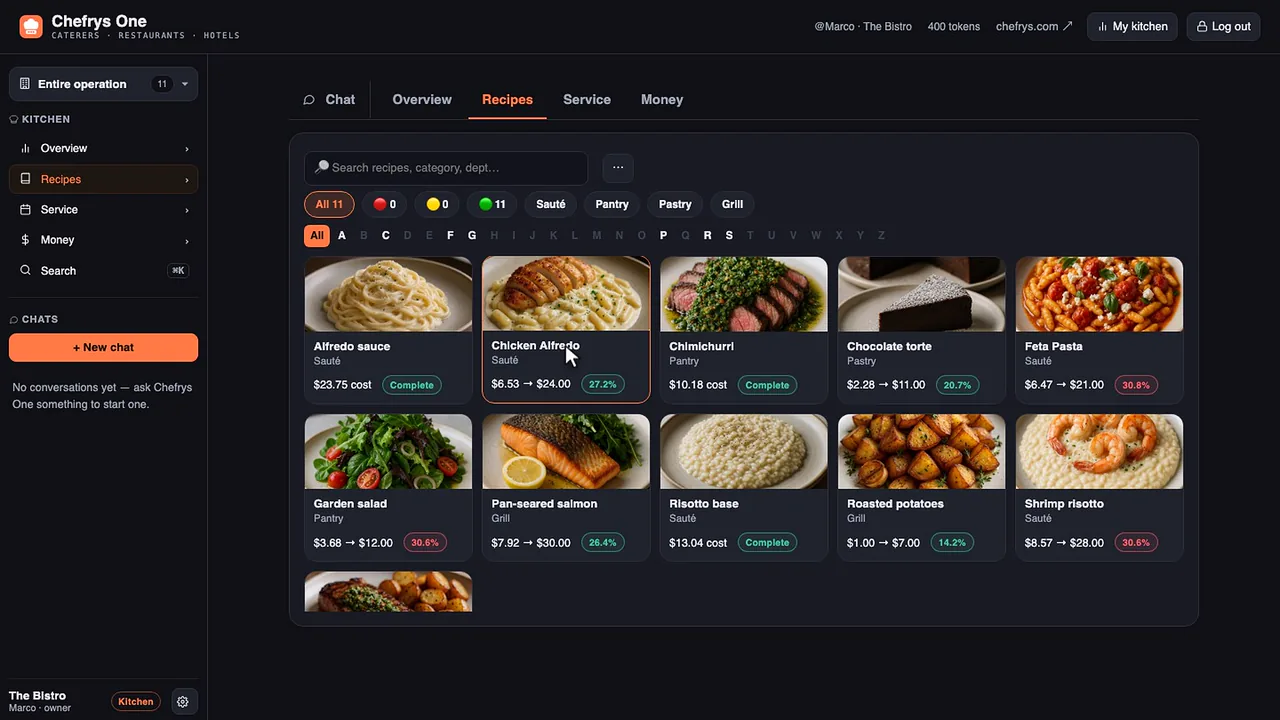
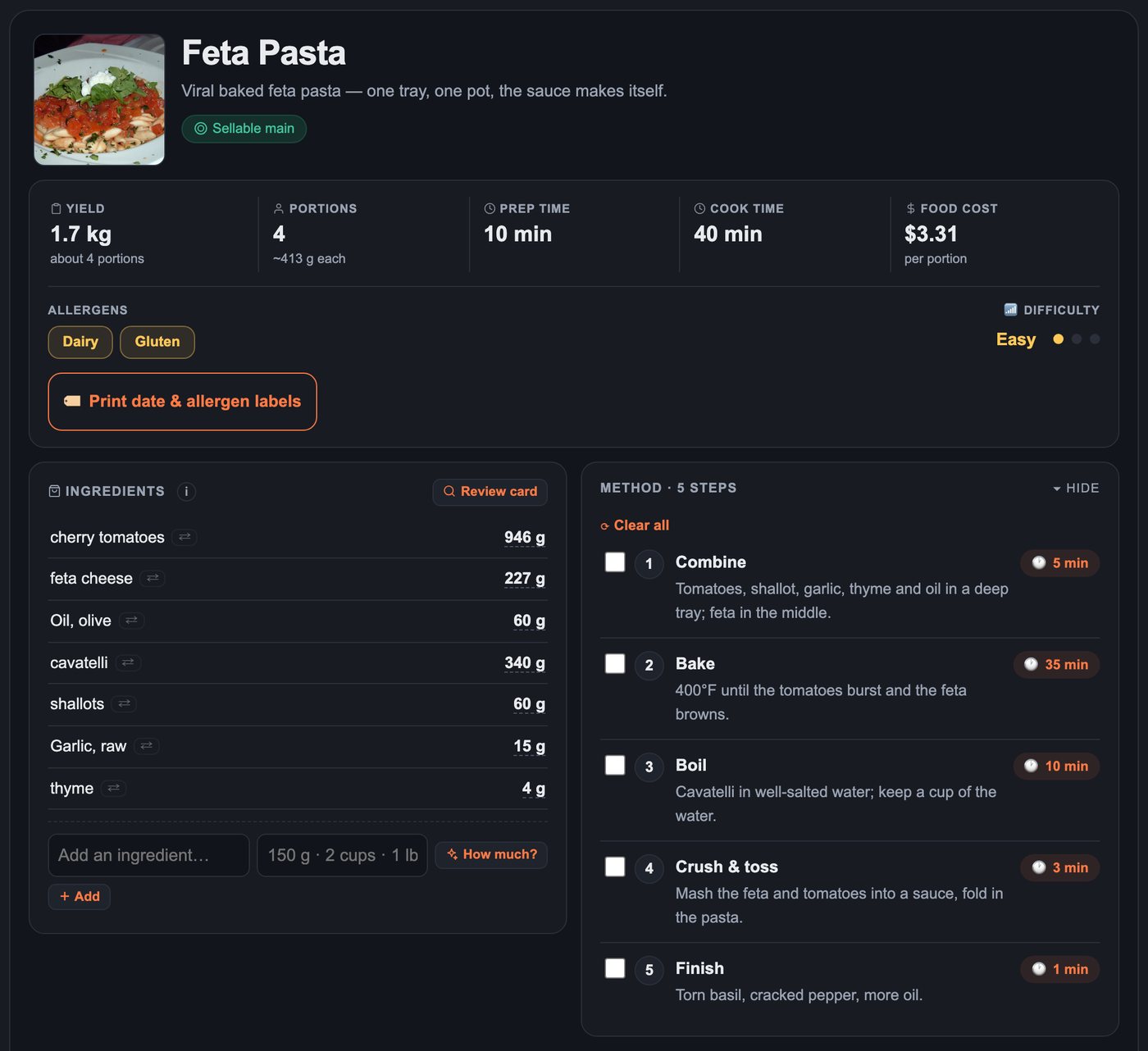
Bring in your recipe sheets, photos or links. Build a searchable library with ingredients, methods and portion costs in one place.
Give your team a focused count screen, with the units they use on the shelf. Bring inventory, par levels and purchasing into the same workflow.
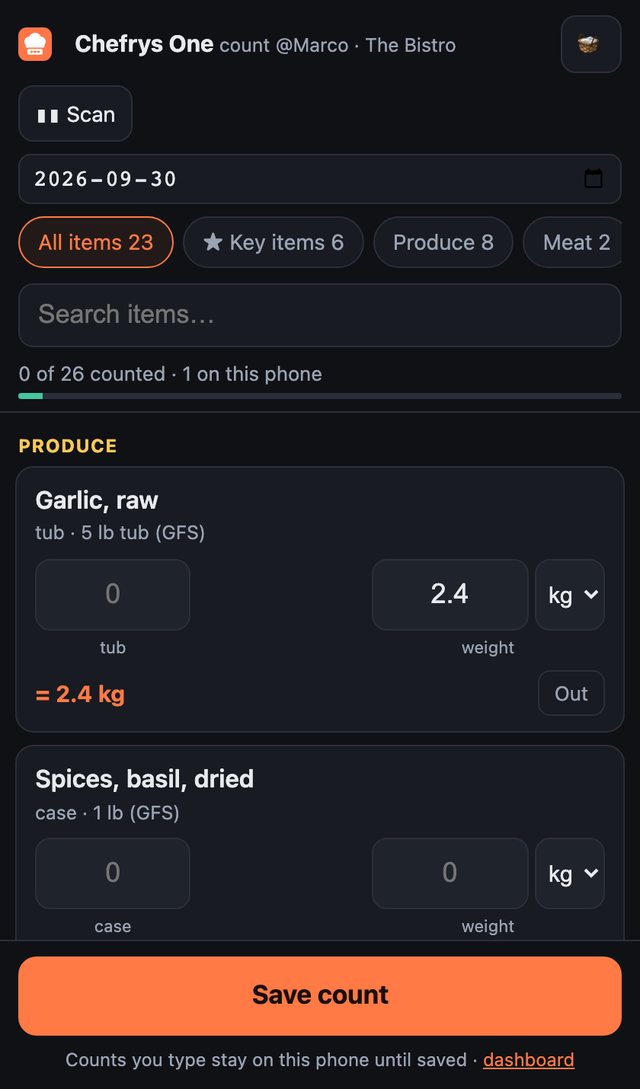
Cooks and counters get focused screens. Managers and owners control access.
Actual product · demo data
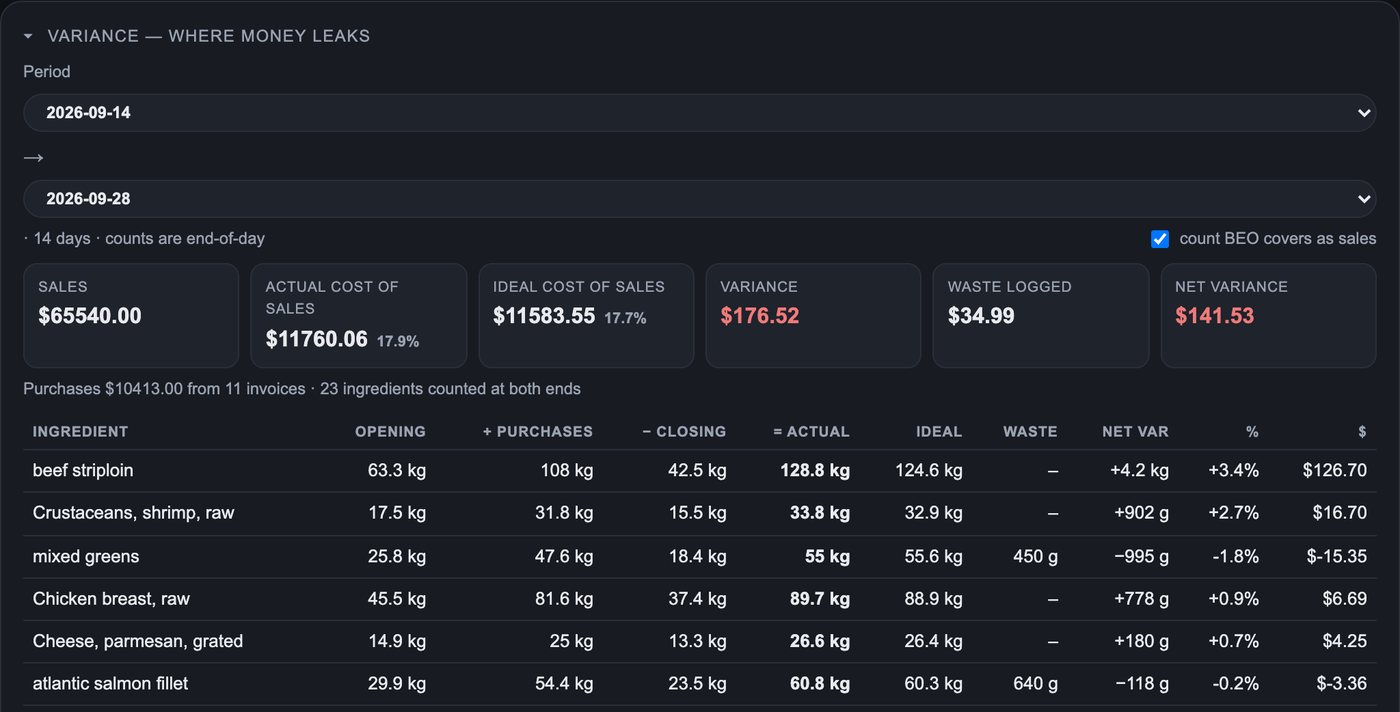
Bring recipe costs and sales together to understand your menu. Review price changes, stock usage and recorded waste to decide what needs attention.
The moment a count, a delivery or the day’s sales puts an item under par, the right people hear about it. Chefrys One drafts the order by supplier, and one click sends it by email or by an automated phone call that names your restaurant, reads every line and asks the supplier to press 1.
Hear what the supplier hears when you tap Call — 31 seconds, demo order.
Start with what you already have
You don’t need to rebuild your kitchen in a spreadsheet before you get started.
Upload a recipe PDF, photograph an invoice, import a sales export or forward a supplier email to your kitchen’s private address.
Chefrys One uses AI to extract the information. Check the review card, correct anything that needs attention, and save it.
Your saved ingredients, prices and recipes feed costing, purchasing and prep. Build the picture as you bring in more of your kitchen.
AI-assisted imports stay reviewable. Costing reflects the prices and quantities in your kitchen data.
Built for the work around the food
The details that turn a recipe library into a working kitchen platform.
Read supplier documents, keep pack sizes and prices together, and create orders grouped by supplier.
Turn production plans into prep lists. Keep station instructions, recipe cards and printable labels close to service.
Ask questions about your kitchen data, get help with recipes, and explore ingredient substitutions with cost in view.
Save inspiration from recipe sites and social videos. Organize it into cookbooks and turn recipes into grocery lists.
Review a menu-wide allergen matrix, nutritional estimates and substitutions. Keep your team’s knowledge with the recipe.
Give owners, managers, chefs and crew the access they need. Manage separate kitchen workspaces with the Multi-Kitchen plan.
Fits into your kitchen
Chefrys One includes connections for POS, accounting and everyday tools. You can also start with the invoices, documents and exports you already use.
 Square
 Toast
Toast Xero
Xero 7shifts
 WhatsApp
 Slack
SlackConnections require setup and provider access; availability varies. We’ll confirm compatibility with your systems. Logos identify supported providers, not endorsements.
Integrations
Connections require setup and provider access; availability varies by plan and region.
Square CloversoonToast
 Lightspeed Restaurantsoon
 SkyTab by Shift4
 TouchBistro
 QuickBooks OnlinesoonXero
 Gmailsoon
 Outlooksoon
 Email-in
 SMSWhatsAppSlack
 Microsoft Teams
 Discord7shiftsSquare timecardsClover timecardssoon
 PrintNode
 Google Sheetssoon
 Calendar feed
 USDA FoodData Central
 Open Food Facts
 API & webhooks
Switching
Export what you have, then let Chefrys One read it. Five minutes there, a few minutes here.
For the people behind the pass
From independent restaurants to event kitchens, Chefrys One brings the business of food closer to the people making it.
Put food cost in perspective
A change in food-cost percentage can have a real dollar impact. Use your own numbers to see what one percentage point represents.
This is an illustration of the math, not a savings promise. Chefrys One gives you information to act on; results depend on your data and decisions.
Find a plan for your kitchenEstimated annual food sales = weekly purchases × 52 ÷ food-cost %. One percentage point = 1% of those sales.
Straightforward plans
Three plans, one kitchen platform. Every plan includes tokens for the AI work, refilled each month. Pay by card and you’re in within a minute.
For a chef building a costed, organized recipe library.
CAD · billed monthly
Buy Catering Kitchen400 tokens / month · 1 named login
For teams connecting food, inventory and day-to-day operations.
CAD · billed monthly
Buy Chef’s Kitchen1,500 tokens / month · 5 named logins
For operators managing up to three kitchen locations.
CAD · billed monthly
Buy Multi-Kitchen4,500 tokens / month, pooled · 15 named logins
Hotel groups, multi-site operators and contract caterers.
Tokens pay for the AI work: reading documents, questions, captures, maps and photos. Catering Kitchen comes with 400 a month, Chef’s Kitchen 1,500 and Multi-Kitchen 4,500 pooled; a busy kitchen uses about 130. Counts, recipe browsing and reports never spend tokens. Need more? $20 CAD per 100. Choose your billing interval when you subscribe.
No card for the trial. When you're ready, pick a plan inside Chefrys One and pay by card — cancel any time.
A few good questions
Something specific to your kitchen?
Start with one recipe and a supplier invoice or price list. Review the extracted details and see a dish costed with your own numbers. Add counts, sales and production plans as you build out your kitchen.
Only if you switch automatic mode on. Even then, each order waits for a manager’s approval unless it is small and nothing about it looks unusual, and an owner can turn automatic ordering off for the whole organization at any time. Every order keeps a trail of who did what and when, and the invoice is checked against what was ordered.
Use it to prepare a draft, then check the result. Upload review cards let you correct ingredient names, quantities and prices before saving. Costs and reports depend on the data you provide. Allergen tags and nutritional estimates need your team’s verification against ingredients and supplier information.
Yes. Chefrys One has focused phone screens for recipes, prep, grocery lists and stock counts. Assign cook or counter roles and issue sign-in codes, without giving everyone access to your kitchen’s financial information.
Chefrys One includes connections for systems such as Square, Toast and Xero, plus tools for email and labour data — Clover and QuickBooks Online are coming soon. Setup and availability depend on the provider and your account. Ask us to confirm your setup, or start with sales exports and supplier documents.
Try it when you want to see your own recipes and invoices in Chefrys One first: Catering Kitchen or Chef’s Kitchen, 14 days, no card, 50 or 100 tokens to start, and everything you build stays when you choose a plan. Buy it when you already know your plan, or you want Group: press Buy in the pricing section, pay by card, and you’re in within a minute. You can switch plans any time inside the app.
Tokens pay for everything Chefrys One reads, answers or draws for you: document sends, recipe captures from links and email, questions to Roux, substitutions, buffet maps and dish photos. Each plan refills your balance every month — Chef 400, Kitchen 1,500, Group 4,500 pooled — and a busy kitchen uses about 130. A document or capture is one token; a question is half, or one when Roux searches the web or writes at length; a buffet map is two and a dish photo half. Counts, recipe browsing, cookbooks, grocery lists and reports never spend tokens. Unused tokens roll over, and a pack of 100 is $20 CAD. A trial starts with 50 tokens on Catering Kitchen or 100 on Chef’s Kitchen. Multi-Kitchen has no trial — buy it in the pricing section, or start on Chef’s Kitchen and switch any time. Your balance is always in the header of the app.
Bring your recipe cards, supplier lists, sales exports and countsheets. Chefrys One supports common document and spreadsheet formats and understands Optimum Control terminology. We can help you choose what to import first; review the results before relying on them.
Your account and data stay. Pick a plan inside Chefrys One (Plan & billing in the sidebar) and pay by card; if you decide not to continue, nothing is charged and you can export everything. Plan prices are in Canadian dollars. Kitchens outside Canada are welcome; your card is charged in CAD and your bank converts at its own rate.
Only what acts outside Chefrys One in your name — automated supplier calls, order emails, sign-in texts, automatic ordering — plus drawn dish photos and buffet maps. Everything else — recipes, costing, counts, invoices, alerts, Roux, integrations — is fully open. They switch on the moment you choose a plan; your kitchen doesn’t change.
Yes. You can export kitchen data including recipes, suppliers and counts as CSV. Team access is controlled by roles, with a separate workspace for each kitchen. See our Privacy Policy for details.
Free trial
Catering Kitchen or Chef’s Kitchen, the full product, no credit card. Catering Kitchen starts with 50 tokens, Chef’s Kitchen with 100 — enough for your menu, your first invoices and a first count.
Tell us about your kitchen. We’ll arrange a demo around the work you want to simplify.
Your own kitchen, the full product for 14 days. Choose a plan when you're ready — everything you've built stays exactly where it is.
Switching from ? Export first — it takes five minutes.